
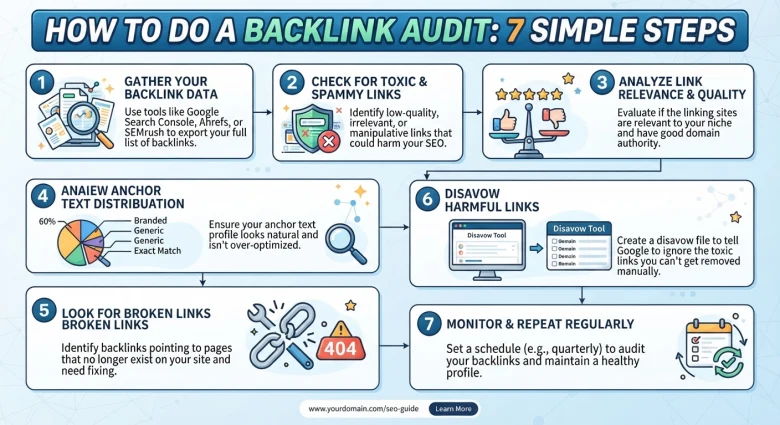
A backlink audit is a review of every website that links to yours. The goal is to find which links help your rankings, which do nothing, and which could hurt you. If your rankings have stalled, or you have ever bought cheap link packages, this is one of the best checks you can run.
This guide walks through the process step by step, and you don't need expensive software.
What is a backlink audit?
A backlink audit is a check of your incoming links for quality, relevance, and risk. You collect every link pointing to your site, sort them into good, neutral, and harmful, and then decide what to keep, ignore, or disavow.
Why does a backlink audit matter?
Search engines use links as a trust signal. Good links from relevant, respected sites can lift your rankings. Large numbers of spammy links, such as mass blog comments or automated link blasts, can make your site look low quality, and they rarely deliver lasting results.
An audit also shows you which pages attract links, who links to your competitors, and where you have gaps.
Step 1: Export all your backlinks
Start with Google Search Console. Go to Links, then Top linking sites, and export the data. This is free and comes straight from Google.
If you have access to a paid tool, export from it too and combine the lists. No single tool sees every link, so using two sources gives a fuller picture.
Step 2: Put the links in a spreadsheet
Create columns for:
- Linking domain
- Linking page URL
- Target page on your site
- Anchor text
- Relevance (high, medium, low)
- Quality (good, neutral, bad)
- Action (keep, ignore, remove, disavow)
Sorting by domain makes it easy to spot sites that link to you many times.
Step 3: Check the quality of each linking site
For each linking domain, ask:
- Is the site real, with original content and a clear purpose?
- Is it related to your topic?
- Does it look maintained, or is it full of ads and unrelated posts?
- Would a real visitor ever click the link?
A link from a relevant industry blog is far more valuable than one from a random directory in another language.
Step 4: Look for warning signs
Flag links that show these patterns:
- Hundreds of links from one site, or from many sites with identical layouts
- Links placed in comment sections or forum profiles with no context
- Exact-match anchor text repeated over and over, such as "cheap SEO service"
- Sites that exist only to sell links
- Pages that are mostly lists of outgoing links
If you bought a package promising thousands of backlinks for a few dollars, expect to find many of these.
Step 5: Review your anchor text
Anchor text is the clickable words of a link. A natural profile has a mix of brand names, page titles, plain URLs, and generic phrases like "read more." If most of your anchors are the same money keyword, that looks manipulated.
Step 6: Decide what to do with each link
|
Situation |
Action |
|---|---|
|
Relevant, trusted site |
Keep |
|
Harmless but low value |
Ignore |
|
Spammy link you can get removed |
Email the site owner and ask for removal |
|
Clearly manipulative and cannot be removed |
Consider the disavow tool |
Be careful with disavowing. Google has said most sites do not need it, and it is mainly for cases of obvious link schemes or a manual action. Disavowing good links by mistake can hurt you, so only use it for links you are sure about.
Step 7: Plan better links going forward
Use what you learned to build links that last:
- Write guest posts for relevant sites, with real value for their readers.
- Create resources worth linking to, such as guides, checklists, and original research.
- Look at your competitors' best links and ask whether you can earn similar ones.
- Fix broken links by finding dead pages on other sites that you can replace with your content.
Repeat the audit every 3 to 6 months, or after any large link-building campaign.
Backlink audit checklist
- Export links from Search Console (and one other tool if possible)
- Organise them in a spreadsheet
- Rate each domain's quality and relevance
- Flag spam patterns
- Review anchor text balance
- Remove, ignore, or disavow as needed
- Make a plan for new, relevant links
Frequently asked questions
How often should I audit my backlinks? Every 3 to 6 months is enough for most sites. Do it sooner if your traffic drops suddenly or you have recently bought links.
Are all low-authority links bad? No. A small, relevant site can send useful traffic and a natural link. Relevance matters more than a score.
Can bad backlinks hurt my rankings? Search engines mostly ignore low-quality links, but patterns of manipulative links can cause problems. That is why checking is worth the time.
Do I need a paid tool? No. Search Console plus a spreadsheet covers the basics. Paid tools save time on larger sites.
Final thoughts
A backlink audit takes a few hours and tells you exactly where your link profile stands. Fix the risks, keep what works, and spend your effort on links that real people would actually click.
Need help building quality links? See our link building services.